Tutorial: OpenAI Workload Identity Federation
OpenAI's Workload Identity Federation (WIF) allows workloads to authenticate to the OpenAI API using short-lived identity tokens from an external identity provider instead of static API keys.
Static API keys act like a password. Anyone who has one can access a resource indefinitely until the key is explicitly revoked. Workload Identity Federation removes this risk entirely: Credentials are issued on demand, scoped to a single workload, and expire after a short, defined lifetime. OpenAI access tokens never outlive the subject token used for the exchange.
What you will set up
In this tutorial, you will configure a trust chain that allows your workloads to call the OpenAI API without any static credentials:
- Register your Defakto trust domain as a Workload Identity Provider with OpenAI, so OpenAI can verify JWT-SVIDs issued by your workloads.
- Create an OpenAI service account that defines the permissions and project access for your workloads.
- Create a service account mapping that maps a workload's SPIFFE ID to the service account. Only workloads whose identity matches the mapping can authenticate.
- Configure your workload to fetch a JWT-SVID from Defakto and exchange it for a short-lived OpenAI access token, which the SDK uses to call the OpenAI API.
The result is that each workload proves its identity through its SPIFFE ID, OpenAI verifies it against the service account mapping, and grants access as the mapped service account. There are no API keys to distribute, rotate, or revoke.
Defakto-issued JWT-SVIDs are a natural fit for this model. Every Defakto trust domain includes a publicly reachable OIDC Discovery endpoint, so OpenAI can automatically discover and validate JWT-SVIDs issued to your workloads.
Preconditions:
- Active Defakto trust domain
- Access to view trust domain settings via one of:
- A runtime environment for workloads via one of:
- A cluster or node with the Defakto Agent installed
- A local machine using Developer Identity
- OpenAI organization with owner access to the OpenAI Platform
1. Determine the OIDC Discovery Endpoint
Defakto automatically publishes an OIDC Discovery document for all trust domains. You need the JWT Issuer URL to register with OpenAI.
- CLI
- Console
- Ensure that
spirlctlis installed, and usespirlctl loginto log in via SSO. - Run
spirlctl trust-domain info <TRUST_DOMAIN>to find the JWT Issuer URI for your trust domain:$ spirlctl trust-domain info example.comGetting Trust Domain Info⠼ID td-bpepnha31bName: example.comStatus: availableSelf-Managed: falseSPIRL Agent Endpoint: td-bpepnha31b.agent.spirl.com:443SPIFFE Bundle Endpoint: https://fed.spirl.org/t-su8rvkjgix/td-bpepnha31b/bundleJWT Issuer: https://fed.spirl.org/t-su8rvkjgix/td-bpepnha31bJWKS Endpoint: https://fed.spirl.org/t-su8rvkjgix/td-bpepnha31b/jwksOIDC Discovery Endpoint: https://fed.spirl.org/t-su8rvkjgix/td-bpepnha31b/.well-known/openid-configurationCreated At: 2024-09-05 00:41:36.716 +0000 UTCLast Updated At: 2025-07-07 15:15:14.718 +0000 UTC - Copy the JWT Issuer URI (e.g.
https://fed.spirl.org/t-su8rvkjgix/td-bpepnha31b). This is the issuer URL you will register with OpenAI.
- Log in to the Defakto Console.
- Navigate to your trust domain, then go to Settings → Trust domain URLs.
- Copy the JWT Issuer URL that is displayed.
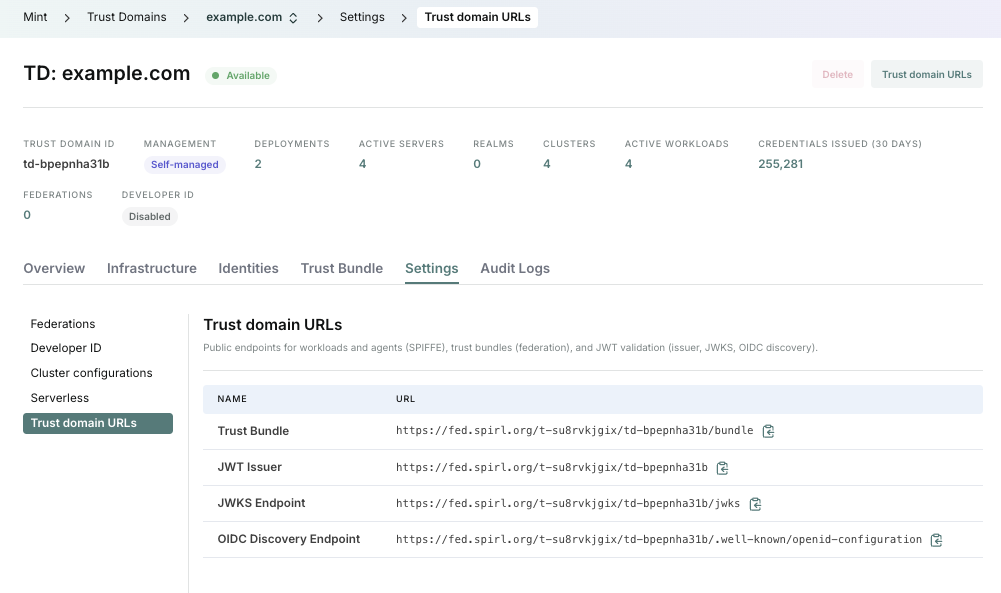
You can verify the contents of the discovery endpoint by fetching the well-known configuration document:
$ curl -s https://fed.spirl.org/t-su8rvkjgix/td-bpepnha31b/.well-known/openid-configuration | jq
{
  "issuer": "https://fed.spirl.org/t-su8rvkjgix/td-bpepnha31b",
  "jwks_uri": "https://fed.spirl.org/t-su8rvkjgix/td-bpepnha31b/jwks",
  "authorization_endpoint": "",
  "response_types_supported": [
    "id_token"
  ],
  "subject_types_supported": [],
  "id_token_signing_alg_values_supported": [
    "RS256",
    "ES256"
  ]
}
2. Register a Workload Identity Provider in the OpenAI Platform
In the OpenAI Platform, navigate to Organization Settings → Security → Workload Identity Provider.
-
Click Create identity provider and fill in the following:
Field Value Name A descriptive label (e.g. defakto-example-com)OIDC Issuer URL The JWT Issuer URL from Step 1 (e.g. https://fed.spirl.org/t-su8rvkjgix/td-bpepnha31b)Audience https://api.openai.com/v1 -
Leave Use uploaded JWKS for token verification disabled.
Defakto publishes a standards-compliant
/.well-known/openid-configurationendpoint. OpenAI automatically discovers and fetches the signing keys via OIDC discovery. You do not need to upload a JWKS manually. -
Skip Attribute transformations unless you need to derive a mapping value from one or more token claims using CEL expressions. Attribute transformations are not required when mapping directly on the
subclaim (the SPIFFE ID). -
Copy the Workload Identity Provider ID. You will need it when configuring your workload in Step 4.
For more detail on provider configuration options (uploaded JWKS, attribute transformations, key rotation), see the OpenAI WIF guide.
3. Create a Service Account Mapping
From the Workload Identity Provider details page, create a service account mapping that authorizes your workload's SPIFFE ID to mint tokens for an OpenAI service account.
-
Click Create mapping and configure:
Field Value Name A descriptive label (e.g. defakto-inference-worker)Key subValue The SPIFFE ID of the workload (e.g. spiffe://example.com/ns/inference/sa/worker)Project The OpenAI project that owns the target service account Service account The service account the workload can use (create a new one or select existing) Permissions Optional API permissions to further narrow access (e.g. api.model.request)Field details
Key and Value — The key
submatches the JWT-SVID'ssubclaim, which is the workload's SPIFFE ID. String values may use one trailing wildcard: an exact value likespiffe://example.com/ns/inference/sa/workermatches only that workload, whilespiffe://example.com/ns/inference/sa/*matches all workloads under that path. Be as specific as possible. The wildcard must have a non-empty prefix;*by itself is not supported.The SPIFFE ID assigned to each workload is determined by the path template configured for the cluster.
Audience — The audience is configured on the Workload Identity Provider (Step 2), not on the mapping. OpenAI verifies that the JWT-SVID's
audclaim matches the provider's configured audience. You must also configure your workload to request this same audience when fetching the JWT-SVID (shown in Step 4).Permissions — Optional API permissions that further narrow access tokens minted from this mapping. These permissions cannot grant access beyond the mapped service account. Leave blank to use the service account's full permissions. Token exchange responses expose restrictions as OAuth scopes in the
scopeproperty.Additional claims — For more granular matching beyond the SPIFFE ID, you can add custom claims to your JWT-SVIDs using the JWT-SVID Customization feature. Custom claims such as
namespaceorpod_service_accountcan then be matched via attribute transformations defined on the Workload Identity Provider.Multiple trust domains — Each Defakto trust domain has its own signing keys and federation endpoint. Register each as a separate Workload Identity Provider in OpenAI.
For further details on mapping configuration, see the OpenAI documentation:
- SPIFFE setup guide — SPIFFE-specific configuration and best practices
- Service account mappings — attribute matching, wildcard values, and mapping resolution
-
Note the following IDs. Your workload will need them:
- Workload Identity Provider ID
- Service account ID
4. Configure Your Workload
Your workload exchanges its Defakto-issued JWT-SVID for an OpenAI access token at runtime. The OpenAI SDKs handle the exchange and automatic refresh.
For the full SDK reference including all supported languages, see the OpenAI SPIFFE WIF documentation.
If OPENAI_API_KEY is set in your environment, the SDK uses the API key
instead of federation. Unset this variable before testing WIF.
Set the following environment variables on your workload. The Kubernetes examples below embed these in the pod spec.
OPENAI_IDENTITY_PROVIDER_ID=<your-provider-id>
OPENAI_SERVICE_ACCOUNT_ID=<your-service-account-id>
Replace the placeholder values above (and in the Kubernetes pod specs below) with the IDs you noted in Steps 2 and 3.
Choose one of the following approaches to provide the JWT-SVID to the OpenAI SDK:
- Agent (Workload API)
- Agent (SPIRL Bridge)
- Developer Identity
Your application connects directly to the Defakto Agent socket via the SPIFFE Workload API to fetch JWT-SVIDs on demand.
- Go
- Python
Use go-spiffe to fetch JWT-SVIDs
from the Defakto Agent socket:
package main

import (
	"context"
	"fmt"
	"log"
	"os"
	"time"

	"github.com/openai/openai-go/v3"
	"github.com/openai/openai-go/v3/auth"
	"github.com/openai/openai-go/v3/option"
	"github.com/openai/openai-go/v3/responses"
	"github.com/spiffe/go-spiffe/v2/svid/jwtsvid"
	"github.com/spiffe/go-spiffe/v2/workloadapi"
)

const audience = "https://api.openai.com/v1"

// spiffeTokenProvider implements auth.SubjectTokenProvider using the
// SPIFFE Workload API to fetch fresh JWT-SVIDs on demand.
type spiffeTokenProvider struct {
	source *workloadapi.JWTSource
}

func (p *spiffeTokenProvider) TokenType() auth.SubjectTokenType {
	return auth.SubjectTokenTypeJWT
}

func (p *spiffeTokenProvider) GetToken(ctx context.Context, _ auth.HTTPDoer) (string, error) {
	svid, err := p.source.FetchJWTSVID(ctx, jwtsvid.Params{Audience: audience})
	if err != nil {
		return "", fmt.Errorf("failed to fetch JWT-SVID: %w", err)
	}
	return svid.Marshal(), nil
}

func main() {
	ctx, cancel := context.WithTimeout(context.Background(), 30*time.Second)
	defer cancel()

	// Connect to the Defakto Agent socket via the SPIFFE Workload API.
	// Uses the SPIFFE_ENDPOINT_SOCKET env var to locate the Agent socket.
	source, err := workloadapi.NewJWTSource(ctx)
	if err != nil {
		log.Fatalf("failed to create JWT source: %v", err)
	}
	defer source.Close()

	client := openai.NewClient(
		option.WithWorkloadIdentity(auth.WorkloadIdentity{
			IdentityProviderID: os.Getenv("OPENAI_IDENTITY_PROVIDER_ID"),
			ServiceAccountID:   os.Getenv("OPENAI_SERVICE_ACCOUNT_ID"),
			Provider:           &spiffeTokenProvider{source: source},
		}),
	)

	resp, err := client.Responses.New(ctx, responses.ResponseNewParams{
		Model: openai.ChatModelGPT4_1Mini,
		Input: responses.ResponseNewParamsInputUnion{
			OfString: openai.String("Hello, OpenAI"),
		},
	})
	if err != nil {
		log.Fatalf("API call failed: %v", err)
	}

	fmt.Println(resp.OutputText())
}
Ensure SPIFFE_ENDPOINT_SOCKET is set to the Defakto Agent socket address. When using Kubernetes webhooks to inject the socket, SPIFFE_ENDPOINT_SOCKET is set automatically.
Use py-spiffe to fetch
JWT-SVIDs from the Defakto Agent socket:
import os
from openai import OpenAI
from spiffe import JwtSource

AUDIENCE = "https://api.openai.com/v1"

# Connects to the Defakto Agent socket at SPIFFE_ENDPOINT_SOCKET.
jwt_source = JwtSource()


def fetch_jwt_svid() -> str:
    svid = jwt_source.fetch_svid(audience={AUDIENCE})
    return svid.token


client = OpenAI(
    workload_identity={
        "identity_provider_id": os.environ["OPENAI_IDENTITY_PROVIDER_ID"],
        "service_account_id": os.environ["OPENAI_SERVICE_ACCOUNT_ID"],
        "provider": {
            "token_type": "jwt",
            "get_token": fetch_jwt_svid,
        },
    },
)

response = client.responses.create(
    model="gpt-4.1-mini",
    input="Hello, OpenAI",
)
print(response.output_text)
Kubernetes Quickstart
If you already have the Defakto Agent running on your Kubernetes cluster, you can quickly test the integration by launching a pod with the Workload API socket injected and running a script inside it.
- Go
- Python
-
Deploy a pod with the
k8s.spirl.com/spiffe-csi: enabledlabel so the admission controller injects the SPIFFE socket:openai-test.yamlapiVersion: v1kind: Podmetadata:name: openai-testnamespace: defaultlabels:k8s.spirl.com/spiffe-csi: "enabled"spec:restartPolicy: Nevercontainers:- name: testimage: golang:1.24command: ["sleep", "infinity"]env:- name: OPENAI_IDENTITY_PROVIDER_IDvalue: "<your-provider-id>"- name: OPENAI_SERVICE_ACCOUNT_IDvalue: "<your-service-account-id>"kubectl apply -f openai-test.yamlkubectl wait --for=condition=Ready pod/openai-test -
Exec into the pod and set up the Go module:
kubectl exec -it openai-test -- bashInside the pod:
mkdir -p /home/openai-test && cd /home/openai-testgo mod init example.com/openai-test -
Create the test program:
cat > main.go << 'EOF'package mainimport ("context""fmt""log""os""time""github.com/openai/openai-go/v3""github.com/openai/openai-go/v3/auth""github.com/openai/openai-go/v3/option""github.com/openai/openai-go/v3/responses""github.com/spiffe/go-spiffe/v2/svid/jwtsvid""github.com/spiffe/go-spiffe/v2/workloadapi")const audience = "https://api.openai.com/v1"type spiffeTokenProvider struct {source *workloadapi.JWTSource}func (p *spiffeTokenProvider) TokenType() auth.SubjectTokenType {return auth.SubjectTokenTypeJWT}func (p *spiffeTokenProvider) GetToken(ctx context.Context, _ auth.HTTPDoer) (string, error) {svid, err := p.source.FetchJWTSVID(ctx, jwtsvid.Params{Audience: audience})if err != nil {return "", fmt.Errorf("failed to fetch JWT-SVID: %w", err)}return svid.Marshal(), nil}func main() {ctx, cancel := context.WithTimeout(context.Background(), 30*time.Second)defer cancel()source, err := workloadapi.NewJWTSource(ctx)if err != nil {log.Fatalf("failed to create JWT source: %v", err)}defer source.Close()client := openai.NewClient(option.WithWorkloadIdentity(auth.WorkloadIdentity{IdentityProviderID: os.Getenv("OPENAI_IDENTITY_PROVIDER_ID"),ServiceAccountID: os.Getenv("OPENAI_SERVICE_ACCOUNT_ID"),Provider: &spiffeTokenProvider{source: source},}),)resp, err := client.Responses.New(ctx, responses.ResponseNewParams{Model: openai.ChatModelGPT4_1Mini,Input: responses.ResponseNewParamsInputUnion{OfString: openai.String("Hello, OpenAI"),},})if err != nil {log.Fatalf("API call failed: %v", err)}fmt.Println(resp.OutputText())}EOF -
Download dependencies and run:
go mod tidygo run main.goIf everything is configured correctly, you should see OpenAI's response printed to the terminal.
-
Deploy a pod with the
k8s.spirl.com/spiffe-csi: enabledlabel so the admission controller injects the SPIFFE socket:openai-test.yamlapiVersion: v1kind: Podmetadata:name: openai-testnamespace: defaultlabels:k8s.spirl.com/spiffe-csi: "enabled"spec:restartPolicy: Nevercontainers:- name: testimage: python:3.12-slimcommand: ["sleep", "infinity"]env:- name: OPENAI_IDENTITY_PROVIDER_IDvalue: "<your-provider-id>"- name: OPENAI_SERVICE_ACCOUNT_IDvalue: "<your-service-account-id>"kubectl apply -f openai-test.yamlkubectl wait --for=condition=Ready pod/openai-test -
Exec into the pod and install dependencies:
kubectl exec -it openai-test -- bashInside the pod:
pip install openai spiffe spiffe-tls -
Create the test program and run it:
cat > test_openai.py << 'EOF'import osfrom openai import OpenAIfrom spiffe import JwtSourceAUDIENCE = "https://api.openai.com/v1"jwt_source = JwtSource()def fetch_jwt_svid() -> str:svid = jwt_source.fetch_svid(audience={AUDIENCE})return svid.tokenclient = OpenAI(workload_identity={"identity_provider_id": os.environ["OPENAI_IDENTITY_PROVIDER_ID"],"service_account_id": os.environ["OPENAI_SERVICE_ACCOUNT_ID"],"provider": {"token_type": "jwt","get_token": fetch_jwt_svid,},},)response = client.responses.create(model="gpt-4.1-mini",input="Hello, OpenAI",)print(response.output_text)EOFpython test_openai.pyIf everything is configured correctly, you should see OpenAI's response printed to the terminal.
Use SPIRL Bridge as a sidecar to maintain an active JWT-SVID in a file. The OpenAI SDK reads the token from this file on each exchange and your application does not need to embed a SPIFFE library.
- Go
- Python
- TypeScript
package main

import (
	"context"
	"fmt"
	"log"
	"os"
	"strings"
	"time"

	"github.com/openai/openai-go/v3"
	"github.com/openai/openai-go/v3/auth"
	"github.com/openai/openai-go/v3/option"
	"github.com/openai/openai-go/v3/responses"
)

// fileTokenProvider reads a JWT from a file on each call.
type fileTokenProvider struct {
	path string
}

func (f *fileTokenProvider) TokenType() auth.SubjectTokenType {
	return auth.SubjectTokenTypeJWT
}

func (f *fileTokenProvider) GetToken(_ context.Context, _ auth.HTTPDoer) (string, error) {
	data, err := os.ReadFile(f.path)
	if err != nil {
		return "", fmt.Errorf("reading token file: %w", err)
	}
	return strings.TrimSpace(string(data)), nil
}

func main() {
	ctx, cancel := context.WithTimeout(context.Background(), 30*time.Second)
	defer cancel()

	client := openai.NewClient(
		option.WithWorkloadIdentity(auth.WorkloadIdentity{
			IdentityProviderID: os.Getenv("OPENAI_IDENTITY_PROVIDER_ID"),
			ServiceAccountID:   os.Getenv("OPENAI_SERVICE_ACCOUNT_ID"),
			Provider:           &fileTokenProvider{path: os.Getenv("OPENAI_IDENTITY_TOKEN_FILE")},
		}),
	)

	resp, err := client.Responses.New(ctx, responses.ResponseNewParams{
		Model: openai.ChatModelGPT4_1Mini,
		Input: responses.ResponseNewParamsInputUnion{
			OfString: openai.String("Hello, OpenAI"),
		},
	})
	if err != nil {
		log.Fatalf("API call failed: %v", err)
	}

	fmt.Println(resp.OutputText())
}
import os
from pathlib import Path
from openai import OpenAI

token_path = os.environ["OPENAI_IDENTITY_TOKEN_FILE"]

# Reads the JWT-SVID from the file written by SPIRL Bridge.
client = OpenAI(
    workload_identity={
        "identity_provider_id": os.environ["OPENAI_IDENTITY_PROVIDER_ID"],
        "service_account_id": os.environ["OPENAI_SERVICE_ACCOUNT_ID"],
        "provider": {
            "token_type": "jwt",
            "get_token": lambda: Path(token_path).read_text().strip(),
        },
    },
)

response = client.responses.create(
    model="gpt-4.1-mini",
    input="Hello, OpenAI",
)
print(response.output_text)
import { readFile } from "node:fs/promises";
import OpenAI from "openai";

const tokenPath = process.env.OPENAI_IDENTITY_TOKEN_FILE!;
const identityProviderId = process.env.OPENAI_IDENTITY_PROVIDER_ID!;
const serviceAccountId = process.env.OPENAI_SERVICE_ACCOUNT_ID!;

const client = new OpenAI({
  workloadIdentity: {
    identityProviderId,
    serviceAccountId,
    provider: {
      tokenType: "jwt",
      getToken: async () => {
        const token = (await readFile(tokenPath, "utf8")).trim();
        if (!token) throw new Error("The SPIFFE JWT-SVID file is empty.");
        return token;
      },
    },
  },
});

const response = await client.responses.create({
  model: "gpt-4.1-mini",
  input: "Hello, OpenAI",
});

console.log(response.output_text);
Standalone
Run SPIRL Bridge to write a JWT-SVID to a file, then set the environment variables. See SPIRL Bridge installation for setup instructions.
spirl-bridge \
  --jwt-audience https://api.openai.com/v1 \
  --jwt-token-path /var/run/secrets/openai.com/token
export OPENAI_IDENTITY_TOKEN_FILE=/var/run/secrets/openai.com/token
export OPENAI_IDENTITY_PROVIDER_ID=<your-provider-id>
export OPENAI_SERVICE_ACCOUNT_ID=<your-service-account-id>
Then run your application as normal.
Kubernetes Quickstart
Use pod annotations to inject the SPIRL Bridge sidecar automatically. The Defakto Controller injects the sidecar container and creates the shared volume mount.
The OpenAI SDK re-reads the token file on every token exchange, so it transparently picks up rotated tokens written by SPIRL Bridge.
- Go
- Python
- TypeScript
-
Deploy a pod with SPIRL Bridge annotations:
openai-test.yamlapiVersion: v1kind: Podmetadata:name: openai-testnamespace: defaultlabels:k8s.spirl.com/spiffe-csi: "enabled"annotations:bridge.spirl.com/inject: "*"bridge.spirl.com/jwt-audience: "https://api.openai.com/v1"bridge.spirl.com/jwt-token-path: "/var/run/secrets/openai.com/token"spec:restartPolicy: Nevercontainers:- name: testimage: golang:1.24command: ["sleep", "infinity"]env:- name: OPENAI_IDENTITY_TOKEN_FILEvalue: "/var/run/secrets/openai.com/token"- name: OPENAI_IDENTITY_PROVIDER_IDvalue: "<your-provider-id>"- name: OPENAI_SERVICE_ACCOUNT_IDvalue: "<your-service-account-id>"kubectl apply -f openai-test.yamlkubectl wait --for=condition=Ready pod/openai-test -
Exec into the pod and set up the Go module:
kubectl exec -it openai-test -c test -- bashInside the pod:
mkdir -p /home/openai-test && cd /home/openai-testgo mod init example.com/openai-test -
Create the test program:
cat > main.go << 'EOF'package mainimport ("context""fmt""log""os""strings""time""github.com/openai/openai-go/v3""github.com/openai/openai-go/v3/auth""github.com/openai/openai-go/v3/option""github.com/openai/openai-go/v3/responses")// fileTokenProvider reads a JWT from a file on each call.type fileTokenProvider struct {path string}func (f *fileTokenProvider) TokenType() auth.SubjectTokenType {return auth.SubjectTokenTypeJWT}func (f *fileTokenProvider) GetToken(_ context.Context, _ auth.HTTPDoer) (string, error) {data, err := os.ReadFile(f.path)if err != nil {return "", fmt.Errorf("reading token file: %w", err)}return strings.TrimSpace(string(data)), nil}func main() {ctx, cancel := context.WithTimeout(context.Background(), 30*time.Second)defer cancel()client := openai.NewClient(option.WithWorkloadIdentity(auth.WorkloadIdentity{IdentityProviderID: os.Getenv("OPENAI_IDENTITY_PROVIDER_ID"),ServiceAccountID: os.Getenv("OPENAI_SERVICE_ACCOUNT_ID"),Provider: &fileTokenProvider{path: os.Getenv("OPENAI_IDENTITY_TOKEN_FILE")},}),)resp, err := client.Responses.New(ctx, responses.ResponseNewParams{Model: openai.ChatModelGPT4_1Mini,Input: responses.ResponseNewParamsInputUnion{OfString: openai.String("Hello, OpenAI"),},})if err != nil {log.Fatalf("API call failed: %v", err)}fmt.Println(resp.OutputText())}EOF -
Download dependencies and run:
go mod tidygo run main.goIf everything is configured correctly, you should see OpenAI's response printed to the terminal.
-
Deploy a pod with SPIRL Bridge annotations:
openai-test.yamlapiVersion: v1kind: Podmetadata:name: openai-testnamespace: defaultlabels:k8s.spirl.com/spiffe-csi: "enabled"annotations:bridge.spirl.com/inject: "*"bridge.spirl.com/jwt-audience: "https://api.openai.com/v1"bridge.spirl.com/jwt-token-path: "/var/run/secrets/openai.com/token"spec:restartPolicy: Nevercontainers:- name: testimage: python:3.12-slimcommand: ["sleep", "infinity"]env:- name: OPENAI_IDENTITY_TOKEN_FILEvalue: "/var/run/secrets/openai.com/token"- name: OPENAI_IDENTITY_PROVIDER_IDvalue: "<your-provider-id>"- name: OPENAI_SERVICE_ACCOUNT_IDvalue: "<your-service-account-id>"kubectl apply -f openai-test.yamlkubectl wait --for=condition=Ready pod/openai-test -
Exec into the pod and install the OpenAI SDK:
kubectl exec -it openai-test -c test -- bashInside the pod:
pip install openai -
Create the test program and run it:
cat > test_openai.py << 'EOF'import osfrom pathlib import Pathfrom openai import OpenAItoken_path = os.environ["OPENAI_IDENTITY_TOKEN_FILE"]client = OpenAI(workload_identity={"identity_provider_id": os.environ["OPENAI_IDENTITY_PROVIDER_ID"],"service_account_id": os.environ["OPENAI_SERVICE_ACCOUNT_ID"],"provider": {"token_type": "jwt","get_token": lambda: Path(token_path).read_text().strip(),},},)response = client.responses.create(model="gpt-4.1-mini",input="Hello, OpenAI",)print(response.output_text)EOFpython test_openai.pyIf everything is configured correctly, you should see OpenAI's response printed to the terminal.
-
Deploy a pod with SPIRL Bridge annotations:
openai-test.yamlapiVersion: v1kind: Podmetadata:name: openai-testnamespace: defaultlabels:k8s.spirl.com/spiffe-csi: "enabled"annotations:bridge.spirl.com/inject: "*"bridge.spirl.com/jwt-audience: "https://api.openai.com/v1"bridge.spirl.com/jwt-token-path: "/var/run/secrets/openai.com/token"spec:restartPolicy: Nevercontainers:- name: testimage: node:22-slimcommand: ["sleep", "infinity"]env:- name: OPENAI_IDENTITY_TOKEN_FILEvalue: "/var/run/secrets/openai.com/token"- name: OPENAI_IDENTITY_PROVIDER_IDvalue: "<your-provider-id>"- name: OPENAI_SERVICE_ACCOUNT_IDvalue: "<your-service-account-id>"kubectl apply -f openai-test.yamlkubectl wait --for=condition=Ready pod/openai-test -
Exec into the pod and set up the project:
kubectl exec -it openai-test -c test -- bashInside the pod:
mkdir -p /home/openai-test && cd /home/openai-testnpm init -ynpm install openai -
Create the test program:
cat > index.mjs << 'EOF'import { readFile } from "node:fs/promises";import OpenAI from "openai";const tokenPath = process.env.OPENAI_IDENTITY_TOKEN_FILE;const identityProviderId = process.env.OPENAI_IDENTITY_PROVIDER_ID;const serviceAccountId = process.env.OPENAI_SERVICE_ACCOUNT_ID;const client = new OpenAI({workloadIdentity: {identityProviderId,serviceAccountId,provider: {tokenType: "jwt",getToken: async () => {const token = (await readFile(tokenPath, "utf8")).trim();if (!token) throw new Error("The SPIFFE JWT-SVID file is empty.");return token;},},},});const response = await client.responses.create({model: "gpt-4.1-mini",input: "Hello, OpenAI",});console.log(response.output_text);EOF -
Run the test:
node index.mjsIf everything is configured correctly, you should see OpenAI's response printed to the terminal.
Developer Identity lets you test the OpenAI WIF integration
from your local machine without a running cluster. Developer Identity issues JWT-SVIDs scoped to
your developer identity (e.g. spiffe://example.com/users/acme.com/alice).
The SPIFFE ID for Developer Identity tokens follows the pattern
spiffe://<trust-domain>/users/<email.domain>/<email.username>. Your OpenAI
service account mapping's sub value must match this path (or use a wildcard
like spiffe://example.com/users/*).
- Workload API
- File-based
Use spirlctl dev-id serve to expose a SPIFFE Workload API locally. The Go or
Python examples from the Workload API tab work without modification. Point
SPIFFE_ENDPOINT_SOCKET at the dev-id socket:
spirlctl dev-id serve \
  --trust-domain example.com \
  --jwt \
  --audience https://api.openai.com/v1
The command opens a browser for OIDC login, then serves the Workload API at the default socket path. In a separate terminal:
export SPIFFE_ENDPOINT_SOCKET=unix:/tmp/spirl/devid/workload.sock
export OPENAI_IDENTITY_PROVIDER_ID=<your-provider-id>
export OPENAI_SERVICE_ACCOUNT_ID=<your-service-account-id>
Then run your application as normal.
Fetch a single JWT-SVID and point the OpenAI SDK at the file:
spirlctl dev-id fetch jwt-svid \
  --trust-domain example.com \
  --audience https://api.openai.com/v1
export OPENAI_IDENTITY_TOKEN_FILE=$HOME/.spirl/dev-id/example.com/svids/jwt-svid
export OPENAI_IDENTITY_PROVIDER_ID=<your-provider-id>
export OPENAI_SERVICE_ACCOUNT_ID=<your-service-account-id>
Then run your application as normal. The file-based Go, Python, and TypeScript examples from the SPIRL Bridge tab apply here as well.
The fetched token has a fixed lifetime and is not automatically refreshed. Re-run the command to get a fresh token before the previous one expires.
See the Developer Identity setup guide for prerequisites and administrator configuration steps.
5. Troubleshooting
Inspect a JWT-SVID
Decode the JWT-SVID to check its claims. How you obtain the token depends on which approach you are using:
- Workload API
- SPIRL Bridge / File-based
If your workload connects to the Defakto Agent socket, use
spirldbg to fetch and decode a JWT-SVID directly:
spirldbg svid-jwt --audience https://api.openai.com/v1 --json | jq
If you are using SPIRL Bridge or Developer Identity file-based mode, the token is already on disk:
- SPIRL Bridge (Kubernetes):
/var/run/secrets/openai.com/token - Developer Identity file-based:
$HOME/.spirl/dev-id/example.com/svids/jwt-svid
Decode it in place:
cat /path/to/token | jq -rR 'split(".")[1] | gsub("-";"+") | gsub("_";"/") | @base64d | fromjson'
Verify that:
issexactly matches the issuer URL registered in the OpenAI Platformsubis the workload's SPIFFE ID and matches the service account mapping'ssubvalueaudcontainshttps://api.openai.com/v1expis in the future- The JWT header includes a
kidfield (required by OpenAI)
Common Errors
The token exchange endpoint returns a generic HTTP 500 error for most configuration problems without indicating the specific cause. Because of this, you cannot rely on the error message alone to diagnose the issue. Instead, decode the JWT-SVID (see above) and verify each field against your OpenAI configuration:
| Check | What to verify |
|---|---|
| Issuer | The iss claim exactly matches the OIDC Issuer URL on the Workload Identity Provider. |
| Audience | The aud claim contains the audience configured on the Workload Identity Provider (default: https://api.openai.com/v1). |
| Expiry | The exp claim is in the future. |
| Signature | The kid in the JWT header exists in the JWKS served by your trust domain's JWKS endpoint. |
| Mapping | The sub claim matches the Value field of an enabled service account mapping for the requested service account. |
Token Exchange Request
If you need to manually test the token exchange, use the OpenAI token endpoint directly:
curl https://auth.openai.com/oauth/token \
  -H "Content-Type: application/json" \
  -d '{
    "grant_type": "urn:ietf:params:oauth:grant-type:token-exchange",
    "subject_token_type": "urn:ietf:params:oauth:token-type:jwt",
    "subject_token": "'"$JWT_SVID"'",
    "identity_provider_id": "'"$OPENAI_IDENTITY_PROVIDER_ID"'",
    "service_account_id": "'"$OPENAI_SERVICE_ACCOUNT_ID"'"
  }'
A successful response returns a short-lived bearer token:
{
  "access_token": "eyJ...",
  "issued_token_type": "urn:ietf:params:oauth:token-type:access_token",
  "token_type": "Bearer",
  "expires_in": 3600
}
For the full list of error codes and resolution steps, see the OpenAI WIF reference and the SPIFFE setup guide.