Workload Attestation Extension
Overview
The Workload Attestation Extension is a flexible mechanism that allows external services to enrich workload attributes during the SVID issuing process. Defakto supports two types of extensions:
- Server Extension: A server-side HTTP webhook that enriches attributes during SVID issuance
- Agent Extension: A client-side executable that runs locally on agent nodes to collect custom attributes
Both extension types add custom attributes to workloads that can be used in SPIFFE ID templates, X.509-SVID customization, and JWT-SVID customization.
Why use extensions?
During workload attestation, Defakto collects various attributes from platform sources (Kubernetes, Docker, Linux, etc.). However, you may need to:
- Enrich with external data: Add attributes from Configuration Management Databases (CMDBs), asset management systems, or other external sources
- Hardware-specific attestation: Detect and attest specialized hardware like GPUs, TPUs, or HSMs
- Custom validation: Implement binary signature verification, security compliance checks, or custom authorization logic
- Organization-specific metadata: Add team ownership, cost center, environment tagging, or other organizational metadata
- Dynamic attribute assignment: Calculate attributes based on complex business logic not available through standard platform attestors
Extensions enable these scenarios without modifying Defakto's core product.
How it works
Server Extension
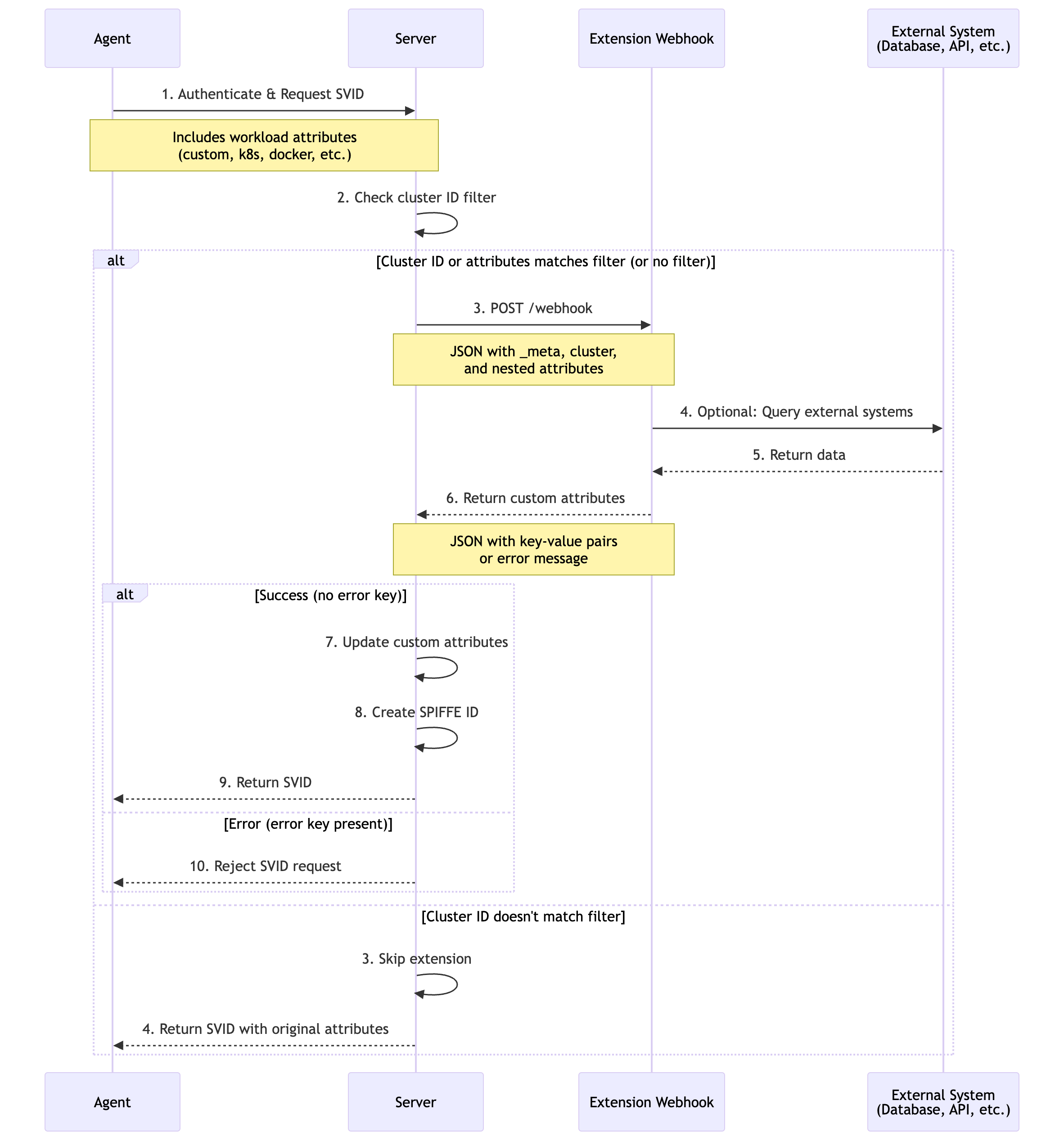
The Server Extension operates as an HTTP webhook service that the trust domain server calls during SVID issuance:
- Workload requests SVID: Agent collects platform attributes and forwards the request to the server
- Server evaluates filters: Checks if cluster ID and workload attributes match configured filters
- Webhook invocation: Server sends HTTP POST request with workload attributes to the webhook endpoint
- External enrichment: Webhook service processes attributes and optionally queries external systems
- Response processing: Server receives custom attributes or error response
- SVID issuance: If successful, custom attributes are added to the workload identity
Agent Extension
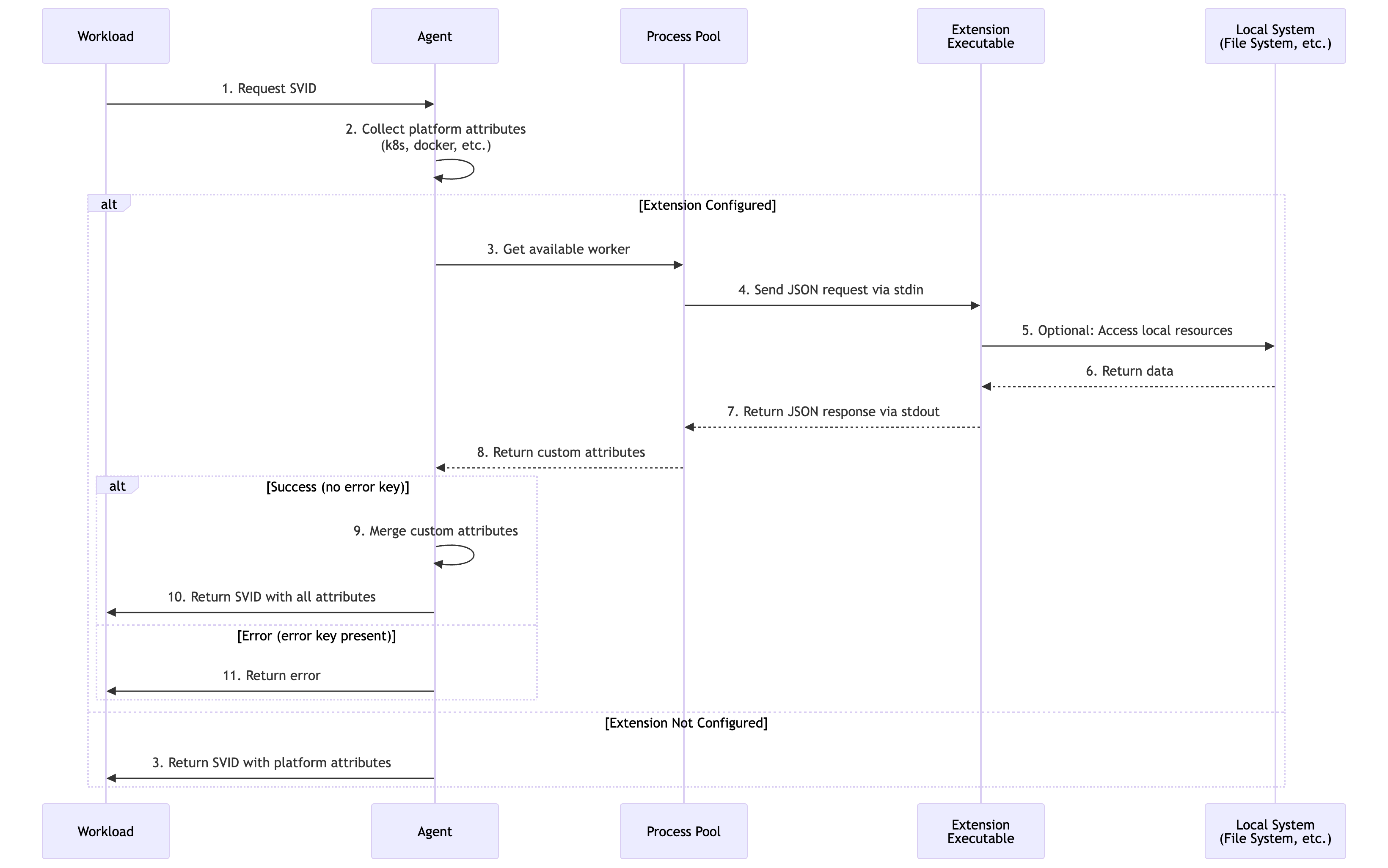
The Agent Extension runs as a local executable on each agent node, maintaining a pool of long-running processes:
- Workload requests SVID: Agent collects platform attributes locally
- Extension invocation: Agent sends JSON request to extension process via stdin
- Local enrichment: Extension executable processes attributes and accesses local resources
- Response processing: Agent receives custom attributes or error via stdout
- SVID request: Agent forwards all attributes (platform + custom) to server
Configuration
Server Extension Configuration
The Server Extension is configured through Helm values in the trustDomainDeployment.deployment.extensionWorkloadAttestation section.
Server Helm Chart
trustDomainDeployment:
  deployment:
    extensionWorkloadAttestation:
      # Required: Webhook URL (HTTP or HTTPS)
      # If empty or not specified, extension is disabled
      webhookUrl: "https://attestation-service.company.com/webhook"

      # Optional: Request timeout (Go duration format)
      # Default: "5s" if not specified
      timeout: "10s"

      # Optional: Cluster ID filter
      # If empty, extension is invoked for ALL clusters
      invokeForClusterIds:
        - "cluster-prod-us-east-1"
        - "cluster-prod-eu-west-1"

      # Optional: Workload attributes filter
      # If empty, extension is invoked for ALL workloads
      invokeForWorkloadAttributes:
        - "custom.appid"
        - "kubernetes.pod.namespace==production"

      # Optional: CA certificate to validate webhook identity
      webhookCaCert: |
        -----BEGIN CERTIFICATE-----
        CERTCHAIN
        -----END CERTIFICATE-----

      # Optional: Authentication type
      # Valid values: "BEARER", "NONE"
      # Default: "NONE"
      authenticationType: "BEARER"

      # Optional: Bearer token for webhook authentication
      # If not specified and BEARER is set, service account token is used
      token: "your-secret-token-in-base64"
Server Configuration Parameters
| Parameter | Type | Default | Required | Description |
|---|---|---|---|---|
webhookUrl | string | "" | Yes | HTTP/HTTPS endpoint. Empty = disabled |
timeout | duration | "5s" | No | Maximum wait time for webhook response |
invokeForClusterIds | []string | [] | No | Limit to specific cluster IDs. Empty = all clusters |
invokeForWorkloadAttributes | []string | [] | No | Invoke only for matching attributes. Empty = all workloads |
webhookCaCert | string | "" | No | Custom CA certificate for TLS validation |
authenticationType | string | "NONE" | No | Authentication type: "BEARER" or "NONE" |
token | string | "" | No | Bearer token. If empty with BEARER, uses service account token |
Agent Extension Configuration
The Agent Extension is configured through the agent.extensionWorkloadAttestation section in the spirl-system chart.
Agent Helm Chart
agent:
  extensionWorkloadAttestation:
    # Path to the extension executable
    # If empty or not specified, extension is disabled
    cmd: "/usr/local/bin/custom-attestor"

    # Arguments to pass to the executable
    args:
      - "--mode=production"
      - "--region=us-east-1"

    # SHA256 checksum for integrity verification
    checksum: "sha256:e3b0c44298fc1c149afbf4c8996fb92427ae41e4649b934ca495991b7852b855"

    # Request timeout (Go duration format)
    # Default: 100ms if not specified
    timeout: "200ms"
Agent Configuration Parameters
| Parameter | Type | Default | Required | Description |
|---|---|---|---|---|
cmd | string | "" | Yes | Path to executable. Empty = disabled |
args | []string | [] | No | Command line arguments |
checksum | string | "" | No | SHA256 checksum for integrity verification |
timeout | duration | "100ms" | No | Maximum wait time for extension response |
Non-Kubernetes Agent
Outside of Kubernetes, extensions can be configured via CLI flags or environment variables.
Server Extension CLI
spirl-server \
  --extension-workload-attestation-webhook-url=https://extension.example.com/attest \
  --extension-workload-attestation-timeout=10s \
  --extension-workload-attestation-invoke-for-cluster-ids=cluster-1,cluster-2 \
  --extension-workload-attestation-invoke-for-workload-attributes=custom.appid \
  --extension-workload-attestation-webhook-ca-cert-path=/etc/spirl/webhook-cas.pem \
  --extension-workload-attestation-webhook-authentication-type=BEARER \
  --extension-workload-attestation-webhook-token-path=/etc/spirl/webhook-token
Agent Extension CLI
spirl-agent \
  --extension-workload-attestation-exec-cmd=/usr/local/bin/custom-attestor \
  --extension-workload-attestation-exec-args=--mode=production \
  --extension-workload-attestation-exec-args=--region=us-east-1 \
  --extension-workload-attestation-exec-checksum=sha256:e3b0c44298... \
  --extension-workload-attestation-timeout=200ms
Attribute Filtering
Both Server and Agent extensions support attribute-based filtering to control when the extension is invoked.
Workload Attribute Filter Syntax
The invokeForWorkloadAttributes filter supports two formats:
- Name-only matching:
origin.key.path- matches if the attribute exists with any value - Value matching:
origin.key.path==value- matches only if the attribute exists and equals the specified value
Multiple patterns use OR logic (if any pattern matches, the extension is invoked).
Examples:
# Invoke for workloads with specific attributes
invokeForWorkloadAttributes:
  - "custom.appid"                              # Any workload with custom.appid attribute
  - "kubernetes.pod.namespace==production"      # Only production namespace
  - "kubernetes.pod.namespace==staging"         # Or staging namespace
  - "linux.user.id==1000"                       # Or specific user ID
Extension Protocol
Server Extension Protocol
Request Format
The server sends a JSON payload via HTTP POST:
{
  "_meta": {
    "version": "1.0"
  },
  "cluster": {
    "cluster_id": "<cluster-id>",
    "cluster_version_id": "<cluster-version-id>"
  },
  "kubernetes": {
    "pod": {
      "name": "app-7d4f5c8b9-xk2lm",
      "namespace": "production"
    }
  }
}
Success Response
{
  "environment": "production",
  "team": "platform",
  "cost_center": "eng-123"
}
Rules:
- All keys become custom attributes with origin
custom - The special key
erroris reserved - Empty object
{}is valid (no custom attributes added)
Error Response
{
  "error": "reason for rejection"
}
Rules:
- The
errorkey must contain a non-empty string - Any other keys are ignored when error is present
- The error message is logged and returned to the agent
Agent Extension Protocol
Request Format
The agent sends JSON via stdin (one request per line):
{
  "_meta": {
    "version": "1.0"
  },
  "kubernetes": {
    "pod": {
      "name": "app-7d4f5c8b9-xk2lm",
      "namespace": "production"
    }
  },
  "pid": "1234"
}
Success Response
Write JSON to stdout (one response per line):
{
  "node_type": "gpu-enabled",
  "gpu_count": "4"
}
Error Response
{
  "error": "GPU detection failed"
}
Example Configurations
Example 1: Server Extension - Environment Tagging
Tag workloads with environment and team information based on namespace:
trustDomainDeployment:
  deployment:
    extensionWorkloadAttestation:
      webhookUrl: "https://attestation.company.com/webhook"
      timeout: "10s"
      invokeForClusterIds:
        - "prod-cluster-1"
        - "prod-cluster-2"
      authenticationType: "BEARER"
Example 2: Agent Extension - GPU Detection
Detect GPU hardware on agent nodes:
agent:
  extensionWorkloadAttestation:
    cmd: "/usr/local/bin/gpu-detector"
    timeout: "200ms"
    checksum: "sha256:a1b2c3d4e5f6..."
Example 3: Server Extension - CMDB Lookup
Query external CMDB for workload metadata:
trustDomainDeployment:
  deployment:
    extensionWorkloadAttestation:
      webhookUrl: "https://cmdb-service.internal/attest"
      timeout: "15s"
      invokeForWorkloadAttributes:
        - "kubernetes.pod.namespace==production"
        - "kubernetes.pod.namespace==staging"
      webhookCaCert: |
        -----BEGIN CERTIFICATE-----
        ... CA certificate ...
        -----END CERTIFICATE-----
      authenticationType: "BEARER"
Example 4: Agent Extension - Binary Verification
Verify workload binary signatures:
agent:
  extensionWorkloadAttestation:
    cmd: "/opt/spirl/binary-verifier"
    args:
      - "--policy=/etc/spirl/verification-policy.yaml"
    timeout: "500ms"
    checksum: "sha256:b2c3d4e5f6a7..."
Example 5: Combining Multiple Filters
Use both cluster ID and attribute filters:
trustDomainDeployment:
  deployment:
    extensionWorkloadAttestation:
      webhookUrl: "https://attestation.company.com/webhook"
      timeout: "10s"
      invokeForClusterIds:
        - "prod-us-east-1"
        - "prod-eu-west-1"
      invokeForWorkloadAttributes:
        - "custom.requires-attestation"
        - "kubernetes.pod.label.security-level==high"
Result: Extension only invoked for workloads in specified production clusters that have either custom.requires-attestation attribute or security-level=high label.
Operational Considerations
Server Extension
Availability and Reliability
- High availability: Deploy webhook service with redundancy and load balancing
- Retry behavior: Server automatically retries on transient failures (HTTP 5xx, timeouts)
- Timeout tuning: Balance between responsiveness and complex processing needs
- Circuit breakers: Consider implementing circuit breakers in webhook service
Security
- TLS validation: Always use HTTPS with valid certificates in production
- Authentication: Use bearer token authentication to verify requests
- Token rotation: Regularly rotate authentication tokens
- Input validation: Webhook must validate all input data
- Rate limiting: Implement rate limiting to prevent abuse
Performance
- Caching: Cache frequently accessed external data
- Response time: Keep webhook response time under configured timeout
- Monitoring: Track webhook latency, error rates, and throughput
Monitoring and Logging
Monitor server logs for extension activity:
DEBUG Calling external webhook {"url": "https://...", "attempt": 0}
INFO Custom attributes added {"count": 3}
ERROR Failed to attest workload via extension webhook {"error": "..."}
Agent Extension
Process Management
- Process pool: Agent maintains pool of long-running extension processes
- Resource limits: Set appropriate CPU and memory limits
- Process crashes: Agent automatically restarts failed processes
- Graceful shutdown: Extension should handle stdin closure
Security
- Checksum verification: Always verify executable checksum in production
- File permissions: Extension executable should have restricted permissions (e.g., 755)
- Principle of least privilege: Run with minimal required permissions
- Input validation: Validate all JSON input
Performance
- Fast execution: Keep processing time under configured timeout
- Local resources: Prefer local resources over network calls
- Minimal dependencies: Keep extension lightweight
Monitoring and Logging
Monitor agent logs for extension activity:
INFO Extension process started {"cmd": "/usr/local/bin/custom-attestor"}
DEBUG Extension request {"pid": "1234"}
INFO Custom attributes collected {"count": 2}
ERROR Extension failed {"error": "..."}
Testing Configurations
- Start in development: Test extensions in non-production environments first
- Use filters: Start with cluster ID or attribute filters to limit scope
- Monitor logs: Watch for errors, timeouts, and performance issues
- Validate attributes: Verify custom attributes appear in SVIDs
- Test failure modes: Ensure proper error handling when extension fails
- Load testing: Test extension performance under expected load
Disabling Extensions
To disable an extension, simply remove the configuration or set the command/URL to empty:
Server:
trustDomainDeployment:
  deployment:
    # extensionWorkloadAttestation: {}  # Commented out or removed
Agent:
agent:
  # extensionWorkloadAttestation: {}  # Commented out or removed
Troubleshooting
Problem: Server extension webhook not being called
Cause: Configuration issue or filter mismatch.
Solutions:
- Verify
webhookUrlis set and accessible from server pods - Check cluster ID filter matches the cluster making requests
- Verify workload attribute filters match the workload
- Review server logs for error messages
- Test webhook endpoint manually with
curl
Problem: Server extension timeout errors
Cause: Webhook taking too long to respond.
Solutions:
- Increase
timeoutvalue (but keep under 15s for production) - Optimize webhook processing logic
- Add caching for external data lookups
- Check network latency between server and webhook
- Review webhook logs for performance bottlenecks
Problem: Server extension TLS validation failures
Cause: Certificate issues.
Solutions:
- Verify webhook certificate is valid and not expired
- Ensure certificate matches webhook hostname
- Configure
webhookCaCertif using private CA - Test TLS connection with openssl s_client
Problem: Server extension authentication failures
Cause: Invalid or missing bearer token.
Solutions:
- Verify
authenticationTypeis set to "BEARER" - Check token is properly configured
- Ensure webhook validates token correctly
- Review token expiration if using time-limited tokens
Problem: Agent extension executable not found
Cause: Incorrect path or missing file.
Solutions:
- Verify
cmdpath is absolute and correct - Check file exists on agent nodes
- Verify file permissions (should be executable)
- Review agent logs for specific error messages
Problem: Agent extension checksum mismatch
Cause: Executable file doesn't match configured checksum.
Solutions:
- Regenerate checksum:
sha256sum /path/to/executable - Update configuration with correct checksum
- Ensure executable hasn't been modified
- Verify file integrity across all agent nodes
Problem: Agent extension timeout errors
Cause: Extension taking too long to process requests.
Solutions:
- Increase
timeoutvalue (but keep under 1s for best performance) - Optimize extension code for faster execution
- Profile extension to identify bottlenecks
- Reduce external dependencies or I/O operations
Problem: Custom attributes not appearing in SVID
Cause: Extension not returning attributes or filter mismatch.
Solutions:
- Verify extension is returning valid JSON response
- Check extension logs for errors
- Ensure attribute names don't conflict with platform attributes
- Review SPIFFE ID template to include custom attributes
- Check attribute redaction configuration isn't filtering custom attributes
Problem: Extension returning errors
Cause: Extension validation or processing failed.
Solutions:
- Review extension logs for detailed error messages
- Verify all required input data is available
- Test extension with sample input data
- Check external dependencies (databases, APIs) are accessible
- Validate extension business logic
Problem: High latency in SVID issuance
Cause: Extension adding significant processing time.
Solutions:
- Reduce extension timeout to fail fast
- Implement caching in extension
- Optimize extension queries and logic
- Consider using agent extension instead of server extension
- Profile and optimize critical paths
Agent Extension Implementation Examples
This section provides practical implementation examples for Agent Extensions, from simple shell scripts to more advanced use cases.
Example 1: Simple Shell Script Extension
A minimal shell script that demonstrates the basic stdin/stdout protocol:
#!/bin/bash

# Simple agent extension that adds a timestamp attribute
# Requires: jq (JSON processor)

while IFS= read -r line; do
    # Validate JSON input
    if echo "$line" | jq . >/dev/null 2>&1; then
        # Extract PID from request
        pid=$(echo "$line" | jq -r '.pid // "unknown"')

        # Generate timestamp
        timestamp=$(date -u +"%Y-%m-%dT%H:%M:%SZ")

        # Return custom attributes as JSON
        echo "{\"attestation_time\":\"$timestamp\",\"attested_pid\":\"$pid\"}"
    else
        # Invalid JSON - return error
        echo "{\"error\":\"invalid JSON input\"}"
    fi
done
Setup and Configuration:
# Generate checksum for Helm configuration
sha256sum /usr/local/bin/simple-attestor
# Output example: abc123def456... /usr/local/bin/simple-attestor
Helm Configuration:
agent:
  extensionWorkloadAttestation:
    cmd: "/usr/local/bin/simple-attestor"
    timeout: "100ms"
    checksum: "sha256:abc123def456..."  # Use actual output from sha256sum
Example Request:
{"_meta":{"version":"1.0"},"kubernetes":{"pod":{"name":"app-pod","namespace":"production"}},"pid":"1234"}
Example Response:
{"attestation_time":"2026-02-21T10:30:45Z","attested_pid":"1234"}
Example 2: GPU Detection (Go)
A more advanced example that detects GPU hardware using NVIDIA tools:
package main

import (
    "bufio"
    "encoding/json"
    "fmt"
    "os"
    "os/exec"
    "strings"
)

type Request struct {
    Meta map[string]string      `json:"_meta"`
    Data map[string]interface{} `json:",inline"`
    PID  string                 `json:"pid"`
}

type Response struct {
    NodeType  string `json:"node_type,omitempty"`
    GPUCount  string `json:"gpu_count,omitempty"`
    GPUModel  string `json:"gpu_model,omitempty"`
    GPUMemory string `json:"gpu_memory,omitempty"`
    Error     string `json:"error,omitempty"`
}

func main() {
    scanner := bufio.NewScanner(os.Stdin)
    encoder := json.NewEncoder(os.Stdout)

    for scanner.Scan() {
        var req Request
        if err := json.Unmarshal(scanner.Bytes(), &req); err != nil {
            encoder.Encode(Response{Error: fmt.Sprintf("parse error: %v", err)})
            continue
        }

        // Detect GPUs using nvidia-smi
        resp := detectGPUs()

        if err := encoder.Encode(resp); err != nil {
            fmt.Fprintf(os.Stderr, "encode error: %v\n", err)
        }
    }
}

func detectGPUs() Response {
    cmd := exec.Command("nvidia-smi",
        "--query-gpu=count,name,memory.total",
        "--format=csv,noheader,nounits")

    output, err := cmd.Output()
    if err != nil {
        // No GPU or nvidia-smi not available
        return Response{NodeType: "cpu-only"}
    }

    lines := strings.Split(strings.TrimSpace(string(output)), "\n")
    if len(lines) == 0 {
        return Response{NodeType: "cpu-only"}
    }

    // Parse first GPU info
    parts := strings.Split(lines[0], ",")
    if len(parts) >= 3 {
        return Response{
            NodeType:  "gpu-enabled",
            GPUCount:  strings.TrimSpace(parts[0]),
            GPUModel:  strings.TrimSpace(parts[1]),
            GPUMemory: strings.TrimSpace(parts[2]),
        }
    }

    return Response{NodeType: "cpu-only"}
}
Build and Deploy:
# Build the extension
go build -o /usr/local/bin/gpu-detector main.go

# Generate checksum
sha256sum /usr/local/bin/gpu-detector
Helm Configuration:
agent:
  extensionWorkloadAttestation:
    cmd: "/usr/local/bin/gpu-detector"
    timeout: "200ms"
    checksum: "sha256:..."
Example Input:
{"_meta":{"version":"1.0"},"kubernetes":{"pod":{"name":"ml-training"}},"pid":"5678"}
Example Output:
{"node_type":"gpu-enabled","gpu_count":"4","gpu_model":"Tesla V100","gpu_memory":"32768"}
Example 3: Binary Signature Verification (Python)
Verify workload binary signatures before issuing SVIDs:
#!/usr/bin/env python3
import json
import sys
import hashlib
import os

def verify_binary(binary_path):
    """Verify binary signature/hash."""
    if not os.path.exists(binary_path):
        return {"error": f"binary not found: {binary_path}"}

    # Calculate SHA256
    sha256 = hashlib.sha256()
    try:
        with open(binary_path, 'rb') as f:
            for chunk in iter(lambda: f.read(4096), b""):
                sha256.update(chunk)

        binary_hash = sha256.hexdigest()

        # Check against known good hashes (simplified)
        known_hashes = load_known_hashes()

        if binary_hash in known_hashes:
            return {
                "binary_verified": "true",
                "binary_hash": binary_hash,
                "signature_valid": "true"
            }
        else:
            return {"error": f"unknown binary hash: {binary_hash}"}

    except Exception as e:
        return {"error": f"verification failed: {str(e)}"}

def load_known_hashes():
    """Load known good binary hashes from file."""
    # In production, read from a configuration file
    return {
        "e3b0c44298fc1c149afbf4c8996fb92427ae41e4649b934ca495991b7852b855",
        # Add more approved binary hashes
    }

def main():
    for line in sys.stdin:
        try:
            req = json.loads(line)

            # Extract binary path from request
            binary_path = req.get('linux', {}).get('binary', {}).get('path', '')

            if not binary_path:
                resp = {"error": "binary path not provided"}
            else:
                resp = verify_binary(binary_path)

            print(json.dumps(resp), flush=True)

        except Exception as e:
            print(json.dumps({"error": str(e)}), flush=True)

if __name__ == '__main__':
    main()
Setup:
# Install the extension
chmod +x /usr/local/bin/binary-verifier

# Generate checksum
sha256sum /usr/local/bin/binary-verifier
Helm Configuration:
agent:
  extensionWorkloadAttestation:
    cmd: "/usr/local/bin/binary-verifier"
    timeout: "500ms"
    checksum: "sha256:..."
Best Practices for Extension Development
When developing agent extensions:
- Handle stdin/stdout correctly: Read JSON line-by-line from stdin, write JSON responses to stdout
- Validate input: Always validate JSON input before processing
- Return proper errors: Use
{"error": "message"}format for error responses - Keep it fast: Extensions should complete within the configured timeout
- Log to stderr: Use stderr for logging, never stdout (reserved for responses)
Related Configuration
Workload Attestation Extensions work in conjunction with:
- SPIFFE ID Templates: Use custom attributes in SPIFFE ID construction
- X.509-SVID Customization: Include custom attributes in certificate extensions
- JWT-SVID Customization: Add custom attributes as JWT claims
- Attribute Redaction: Control which attributes (including custom) are sent to the server